Understanding the HubSpot Sources Report [Video + Cheat Sheet]
2 min read
👋🏼 This is a free lesson from my video course Mastering HubSpot. In just a few minutes a day, you can watch bite-sized lessons that will help you become a HubSpot power user and get more visitors, leads, and customers.
As basic as it is, almost everyone I talk to has at least one misconception about how the HubSpot Sources report works.
This video lesson will give you a good handle on how to interpret the Sources report, tell you where it can deceive you, and explain how it compares to its zany cousin, the Google Analytics Channels report.
I also made a really handy and visual HubSpot Sources Cheat Sheet which you can grab for free. It explains the rules for bucketing visits, contacts, and customers into each source.
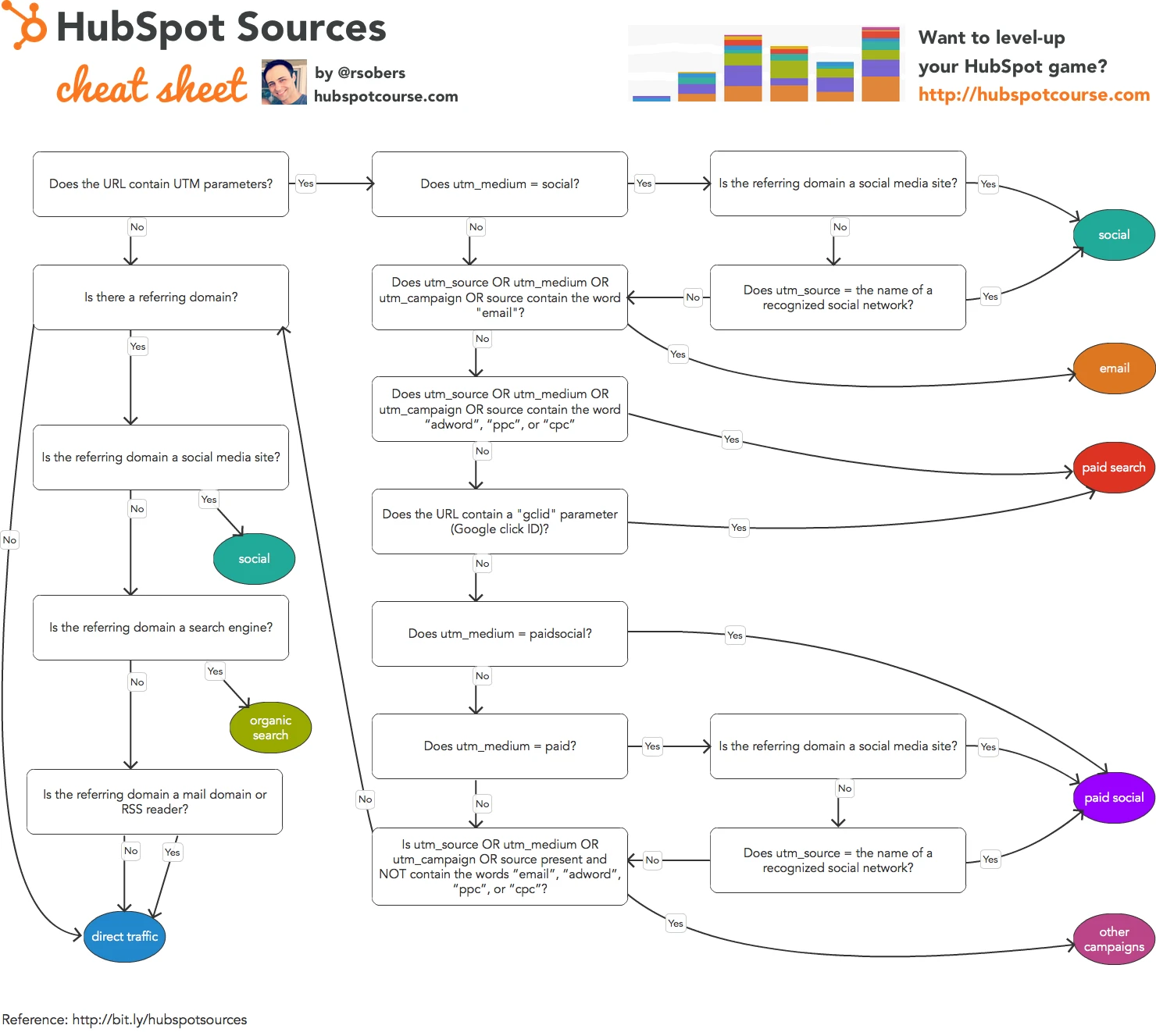
Text version of the 2016 chart
This transcribes the historical cheat sheet; it is not a claim about current HubSpot behavior.
- With UTM parameters, the chart first checks for social traffic: utm_medium is social, and either the referring domain is a social site or utm_source names a recognized social network.
- If social does not match, an email reference in utm_source, utm_medium, utm_campaign, or source sends the visit to email.
- Next, adword, ppc, or cpc in those parameters, or a gclid (Google click ID), sends the visit to paid search.
- utm_medium set to paidsocial sends the visit to paid social. The same applies when utm_medium is paid and the referrer or utm_source identifies a social network.
- Other campaign parameters that do not contain email, adword, ppc, or cpc send the visit to other campaigns. Otherwise, the chart checks the referring domain.
- In the referring-domain branch, social sites produce social traffic and search engines produce organic search.
- No referring domain, a mail domain or RSS reader, or a referrer that matches neither social nor search leads to direct traffic in this chart.